Plugin Development Guide
az-scout supports plugins — pip-installable Python packages that extend the application with custom API routes, MCP tools, UI tabs, static assets, and AI chat modes.
Explore the plugin catalog to find existing plugins, or follow the instructions below to add your own!
How it works
- A plugin registers an
az_scout.pluginsentry point in itspyproject.toml. - At startup, az-scout discovers all installed plugins via
importlib.metadata.entry_points. - Each plugin object must satisfy the
AzScoutPluginprotocol. - Routes, tools, tabs, and chat modes are wired automatically — no configuration needed.
Plugin manager
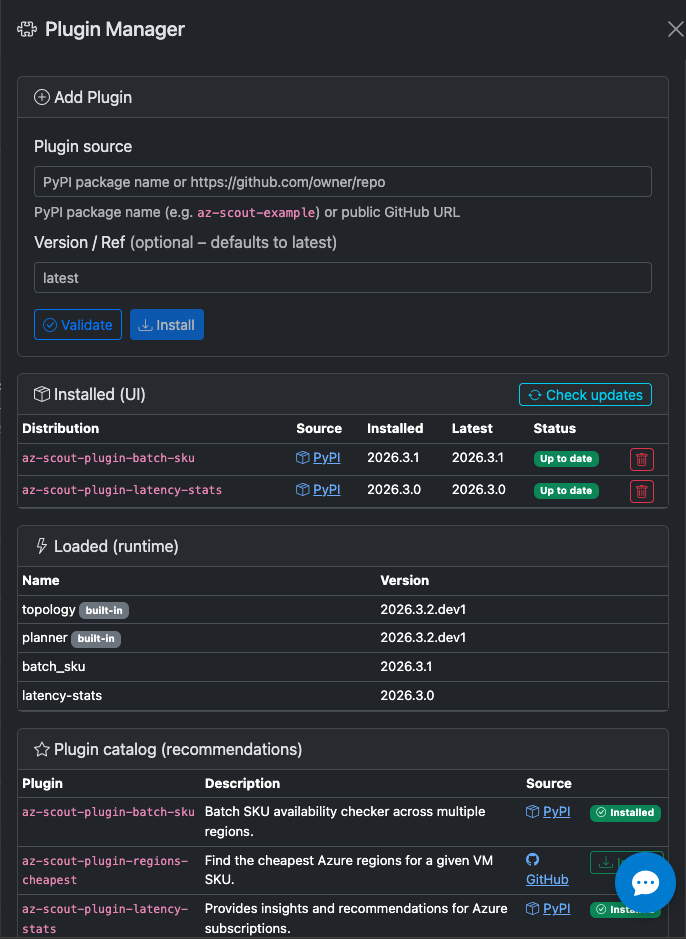
The plugin manager UI shows all discovered plugins, both built-in and external. It fetches the online json plugin catalog to show recommended plugins that can be installed with one click.
Quick start
# From any environment with az-scout installed
az-scout create-plugin

# Move into the generated plugin directory
cd /path/to/generated/az-scout-myplugin

# Install in dev mode alongside az-scout
uv pip install -e .

# Restart az-scout — your plugin is active
az-scout
If you are developing from this repository without installing the package first, you can run:
Plugin protocol
Every plugin must expose an object with these attributes:
from az_scout.plugin_api import AzScoutPlugin, TabDefinition, ChatMode, NavbarAction

class MyPlugin:
    name = "my-plugin"    # unique identifier
    version = "0.1.0"

    def get_router(self) -> APIRouter | None: ...
    def get_mcp_tools(self) -> list[Callable] | None: ...
    def get_static_dir(self) -> Path | None: ...
    def get_tabs(self) -> list[TabDefinition] | None: ...
    def get_chat_modes(self) -> list[ChatMode] | None: ...
    def get_navbar_actions(self) -> list[NavbarAction] | None: ...
    def get_system_prompt_addendum(self) -> str | None: ...

plugin = MyPlugin()  # module-level instance
All methods are optional — return None to skip a layer.
Extension points
| Layer | Method | What it does |
|---|---|---|
| API routes | get_router() |
Returns a FastAPI APIRouter, mounted at /plugins/{name}/ |
| MCP tools | get_mcp_tools() |
List of functions registered as MCP tools on the server |
| UI tabs | get_tabs() |
TabDefinition list — rendered as Bootstrap tabs in the main UI |
| Static assets | get_static_dir() |
Path to a directory, served at /plugins/{name}/static/ |
| Chat modes | get_chat_modes() |
ChatMode list — added to the chat panel mode toggle |
| Navbar actions | get_navbar_actions() |
NavbarAction list — navbar buttons that open offcanvas panels |
| Prompt addendum | get_system_prompt_addendum() |
Extra instructions appended to default discussion system prompt |
TabDefinition
@dataclass
class TabDefinition:
    id: str                       # e.g. "cost-analysis"
    label: str                    # e.g. "Cost Analysis"
    icon: str                     # Bootstrap icon class, e.g. "bi bi-cash-coin"
    js_entry: str                 # relative path to JS file in static dir
    css_entry: str | None = None  # optional CSS file, auto-loaded in <head>
ChatMode
@dataclass
class ChatMode:
    id: str              # e.g. "cost-advisor"
    label: str           # e.g. "Cost Advisor"
    system_prompt: str   # system prompt sent to the LLM
    welcome_message: str # markdown shown when the mode is activated
NavbarAction
A NavbarAction injects a button into the top navbar that opens an offcanvas
panel. The plugin provides the JS file that populates the panel content.
@dataclass
class NavbarAction:
    id: str                       # unique id, used for DOM ids (e.g. "bdd-sku")
    icon: str                     # Bootstrap icon class (e.g. "bi bi-database")
    label: str                    # tooltip + offcanvas header text
    js_entry: str                 # relative path to JS file in static dir
    css_entry: str | None = None  # optional CSS file, auto-loaded in <head>
    width: int = 480              # offcanvas panel width in pixels
The template generates the following DOM elements automatically:
| Element | ID pattern | Description |
|---|---|---|
| Navbar button | {id}-navbar-btn |
Opens the offcanvas via data-bs-toggle |
| Offcanvas panel | {id}-offcanvas |
Bootstrap offcanvas container |
| Offcanvas body | {id}-offcanvas-body |
Empty <div> — populated by your JS |
Example usage
def get_navbar_actions(self) -> list[NavbarAction] | None:
    return [
        NavbarAction(
            id="bdd-sku",
            icon="bi bi-database",
            label="SKU DB Cache",
            js_entry="js/bdd-sku-offcanvas.js",
        )
    ]
The JS file should listen for the Bootstrap show.bs.offcanvas event to
lazy-load its content:
(function () {
    const oc = document.getElementById("bdd-sku-offcanvas");
    const body = document.getElementById("bdd-sku-offcanvas-body");
    let loaded = false;

    oc.addEventListener("show.bs.offcanvas", async () => {
        if (loaded) return;
        const resp = await fetch("/plugins/bdd-sku/static/html/settings.html");
        body.innerHTML = await resp.text();
        loaded = true;
        // bind event listeners after injection
    });
})();
Entry point registration
In your plugin's pyproject.toml:
The plugin object at module level must satisfy AzScoutPlugin.
UI integration
- Plugin tabs appear after the built-in tabs (AZ Topology, Deployment Planner).
- Plugin JS files are loaded after
app.js— they can access all existing globals. - Plugin JS should target
#plugin-tab-{id}as the container for its content. - URL hash
#{tab-id}activates the plugin tab — deep-linking works automatically.
Frontend globals
Plugin scripts run after app.js and can use these globals:
| Global | Type | Description |
|---|---|---|
apiFetch(url) |
function |
GET helper with JSON parsing + error handling |
apiPost(url, body) |
function |
POST helper |
aiComplete(prompt, options?) |
function |
Non-streaming AI completion — returns {content, tool_calls} |
aiEnabled |
boolean |
true if AI chat/completion is configured (Azure OpenAI env vars set) |
renderMarkdown(md) |
function |
Render Markdown to HTML via marked.js (for AI output display) |
tenantQS(prefix) |
function |
Returns ?tenantId=… or "" for the selected tenant |
subscriptions |
Array |
[{id, name}] — subscriptions for the current tenant |
regions |
Array |
[{name, displayName}] — AZ-enabled regions |
Reacting to context changes
Preferred approach: subscribe to core context events emitted by app.js.
document.addEventListener("azscout:regions-loaded", (event) => {
const { regions, tenantId } = event.detail;
// regions global has been refreshed for this tenant
});
document.addEventListener("azscout:tenants-loaded", (event) => {
const { tenants, defaultTenantId, tenantId } = event.detail;
// tenant list was loaded/refreshed; tenantId is the current selected tenant
});
document.addEventListener("azscout:tenant-changed", (event) => {
const { tenantId } = event.detail;
// selected tenant changed; region/subscriptions reload will follow
});
document.addEventListener("azscout:subscriptions-loaded", (event) => {
const { subscriptions, tenantId } = event.detail;
// subscriptions global has been refreshed for this tenant
});
document.addEventListener("azscout:region-changed", (event) => {
const { region, tenantId } = event.detail;
// selected region changed
});
HTML fragments pattern
Keep markup in .html files under static/html/ and fetch at runtime:
async function initTab() {
const pane = document.getElementById("plugin-tab-example");
const resp = await fetch("/plugins/example/static/html/example-tab.html");
pane.innerHTML = await resp.text();
// bind event listeners after injection
}
Vendoring third-party assets (recommended, not enforced)
az-scout ships all of its own third-party assets vendored locally and does not enforce a
Content-Security-Policy. Plugin static assets are served same-origin
(/plugins/{name}/static/…), so anything you ship in your package works out of the box — and,
because there is no CSP, linking to a CDN also works if you choose to.
Vendoring is a recommended convention (best for offline / air-gapped self-hosting and reproducibility), not a requirement: plugins that reuse the core's libraries need no changes.
- Reuse the core's libraries first. Bootstrap (+ Bootstrap Icons), D3, marked, highlight.js and
simple-datatables are already loaded on the page or exposed as globals (
renderMarkdown,escapeHtml,d3, …). Don't re-ship or re-link them. -
Prefer vendoring extra dependencies into your package. For any additional third-party JS/CSS/font, commit the file under
static/vendor/and reference it from your own static prefix:<!-- ✅ vendored, same-origin — works offline / air-gapped --> <link rel="stylesheet" href="/plugins/{name}/static/vendor/chart/chart.min.css"> <script src="/plugins/{name}/static/vendor/chart/chart.min.js"></script> <!-- ⚠️ external CDN — allowed (no CSP), but adds a runtime network dependency --> <script src="https://cdn.jsdelivr.net/npm/chart.js"></script>
Your static/ directory already ships in your wheel, so vendored files behave identically across
local dev, SaaS publishing, and customer self-hosting. To keep things maintainable, mirror the
core and add a dependency-free (stdlib-only) tools/vendor_assets.py-style sync script with pinned
versions; the committed files are the source of truth, so no npm / bundler / build step is
introduced.
MCP tools
MCP tool functions are plain Python functions with type annotations and docstrings:
def my_tool(region: str, subscription_id: str) -> dict[str, object]:
"""Get something useful for a region and subscription.
Returns a dict with the results.
"""
from az_scout.azure_api import some_function
return some_function(region, subscription_id)
The docstring is the tool description shown to LLMs — keep it concise.
Azure ARM helpers for plugins
Plugins that need to make authenticated ARM API calls should use the public
helpers from az_scout.azure_api (available since PLUGIN_API_VERSION = "1.1"):
from az_scout.azure_api import (
AZURE_MGMT_URL,
arm_get, # GET with auth + retry + error handling
arm_post, # POST with auth + retry + error handling
arm_paginate, # GET + follow nextLink pages
get_headers, # raw Bearer-token headers (escape hatch)
ArmAuthorizationError, # raised on HTTP 403
ArmNotFoundError, # raised on HTTP 404
ArmRequestError, # raised after all retries exhausted
)
arm_get(url, *, params=None, tenant_id=None, timeout=30, max_retries=3)
GET an ARM endpoint. Returns the parsed JSON response as a dict.
arm_post(url, *, json, tenant_id=None, timeout=30, max_retries=3)
POST to an ARM endpoint. Returns the parsed JSON response as a dict.
arm_paginate(url, *, params=None, tenant_id=None, timeout=30, max_retries=3)
GET all pages from an ARM list endpoint. Follows nextLink automatically.
Returns the merged value items as a list[dict].
get_headers(tenant_id=None)
Returns raw {"Authorization": "Bearer …"} headers. Use this only for
non-ARM endpoints or custom HTTP libraries — prefer arm_get/arm_post
for standard ARM calls.
All three helpers handle:
- Authentication — Bearer token via
DefaultAzureCredential - 429 rate limiting — retries with
Retry-Afterheader support - 5xx server errors — retries with exponential backoff
- Timeouts — retries on
ReadTimeout - 403/404 — raises typed exceptions (
ArmAuthorizationError,ArmNotFoundError)
Error handling for plugin routes
Plugins can raise typed exceptions from route handlers to produce consistent JSON error responses without manual try/except boilerplate:
from az_scout.plugin_api import PluginError, PluginValidationError, PluginUpstreamError
@router.get("/skus")
async def skus(region: str = "") -> dict[str, object]:
if not region:
raise PluginValidationError("Region is required") # → 422
try:
return get_data(region=region)
except Exception as exc:
raise PluginUpstreamError(f"Failed to load data: {exc}") from exc # → 502
The core app catches PluginError and returns {"error": "…", "detail": "…"}
with the appropriate HTTP status code. The frontend apiFetch helper displays
the message automatically.
| Exception | Default status | Use case |
|---|---|---|
PluginError |
500 | Generic plugin error |
PluginValidationError |
422 | Invalid input from the client |
PluginUpstreamError |
502 | Upstream API call failure |
All three accept an optional status_code keyword to override the default:
Plugin pyproject.toml template
[build-system]
requires = ["hatchling"]
build-backend = "hatchling.build"
[project]
name = "az-scout-myplugin"
version = "0.1.0"
requires-python = ">=3.11"
dependencies = ["az-scout", "fastapi"]
[project.entry-points."az_scout.plugins"]
my_plugin = "az_scout_myplugin:plugin"
[tool.hatch.build.targets.wheel]
packages = ["src/az_scout_myplugin"]
[tool.ruff]
line-length = 100
target-version = "py311"
[tool.ruff.lint]
select = ["E", "F", "I", "W", "UP", "B", "SIM"]
[tool.mypy]
python_version = "3.11"
strict = true
Testing
Plugins can be tested independently. The main app provides:
discover_plugins()— can be mocked to inject test plugins.register_plugins(app, mcp_server)— accepts any FastAPI app and MCP server.
from az_scout.plugins import register_plugins
from az_scout.plugin_api import AzScoutPlugin

def test_my_plugin() -> None:
    plugin = MyPlugin()
    assert isinstance(plugin, AzScoutPlugin)
Known Plugins
Loading plugin catalog…
See the scaffold reference for the complete starter template.